
FIX Google Play Store app problems
Fix Google Play Store not responding server error. The “Google play store” app is one of the most important apps on your mobile devices such as; smartphones and tablets. Whether you are running Android, because it is where you download your favorite apps both free or paid. Yet, sometimes it gives you a headache. Suddenly, it won’t open, and worst, it displays no signs of problems or any error that would help you diagnose the problem. It will just not respond when clicked.
Advertisements
4 Possible reasons, why Google play cannot be opened.
- Google plays cache problems.
- Google play services cache issues.
- Your Google account not synced or wrong account input.
- Download manager is disabled.
See also: How to reset CM Snap too many pattern attemps?
How to Fix and solve Google play’s “cannot be opened problems?”
Here is the step by step guide on how to fix Google Play Store:
1. Clear Google Plays cache, data cache and uninstall updates.
Advertisements
Go to your mobile phone’s “settings” —–>>>>select ”Apps” or “Application Manager”. (Options are dependent on what brand of mobile phone you are using). Then, choose “Google play store”. Another window opens at the right-side of your mobile’s screen which displays all information about Google play and the options to “Force stop”, “Uninstall Updates”, “Clear Data” and “Clear cache”.

- Now clear the cache of Google play store by pressing “clear cache button”.
- Second, delete the “Data cache” trough “clear data button”
- Then, “uninstall updates” of your Google play store app.
Following the instructions above should Fix your Google play store app now. Nevertheless, if the problem continues, take a look at number 2 instructions below.
2. Clear the cache of the Google Services.
Go back to “settings” —->>>“Apps”, repeat the instruction above (number 1) on how to remove Google play store cache but this time in “Google Services”.
Advertisements
3. Re-sync your Google account.
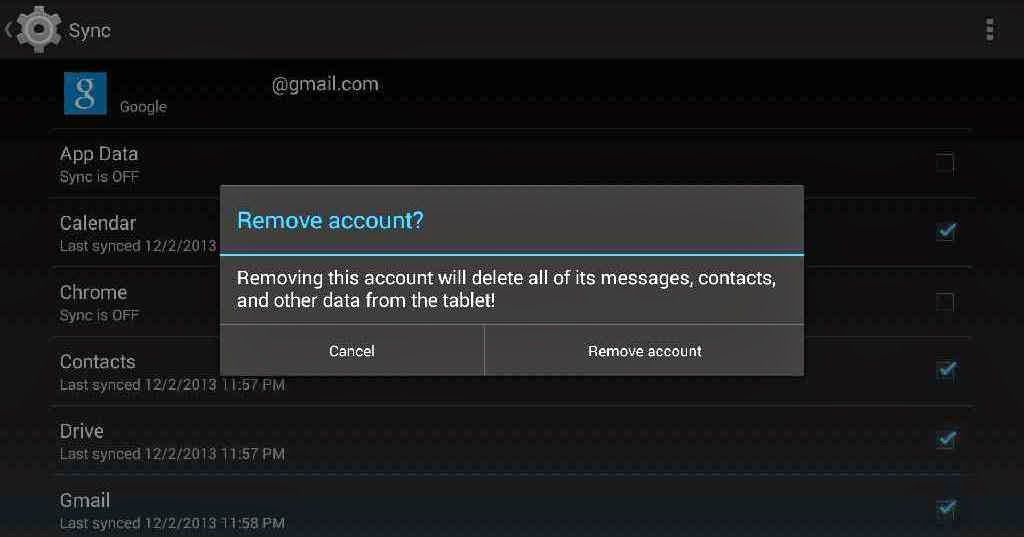
You can simply remove your Gmail account by going to your phone’s “Settings” —>>> “Accounts” —>>> “Google” —->>> Select the account that you used for Google play then click “remove”. Confirm the removal and reboot your Smartphone. After the restart, re-sync your gmail account by going to “settings” —>>>“account” —>>> “add account” —>>>“google”. You should be able to fix and run your Google play app now. Still, Google play won’t run? Take the ultimate step below.
4. Check and enable your “Download manager”
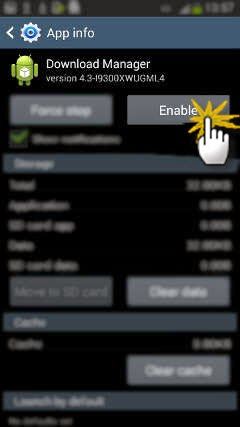
Fix Google Play Store by enabling its “Download Manager”
See also: Dr. Fone Android Data Recovery
Go to “settings” —>>> “apps” or “app manager” click “all apps” then scroll down until you see “download manager” usually it is located at the bottom. Enable it and you are ready to go. You can now open your “Google play store app” again. Any more suggestions on, “how to solve google play app problems? Feel free to discuss it on the comment board below.


May 30, 2017 at 5:13 pm
I got parallel space and when I turn off speed mode click play store the play store will not open.
Hello, I am not very familiar with parallel space, try to deactivate your parallel space and open Google play. If it works, it means there were settings that you need to set or you need to update each. As I researched, it seems that parallel space is compatible to almost all apps but you should check its compatibility with Google play. Contact parallel space support for a better advise.
My playstore doesn’t have the “uninstall updates” feature in the ‘more’ option in the upper right hand corner. It was there before. But not anymore. I tried uninstalling then reinstalling play-store but that doesn’t work. What do you suggest?
Hi, I would suggest that you save all your important files first. Then, do the restore factory settings.
Do a factory reset?? You got to be kidding. Is there any way to fix this other than a factory reset?
Hi Koolx, you mentioned that the google play “uninstall updates” was there before but not anymore. It seems that it got corrupted. If none of the guide above solved your issue, then your problem might be beyond the scope of the solutions offered here. If you don’t want to reset your phone, go to your phone service center and let them solve your issue.
Yeah like my service center is going to know how to fix this. Ok buddy.
Download manager is disabled and I can not enable.
Hello Deborah, please try to save all your files and do a factory reset.
I have new Samsung phone all my apps working except Google Play Store. it keeps asking for current password. I have entered my password but still no joy. Help please !!
Hi, plese try to save all your important files into your SD and restore your phone to factory settings.
Root can install Play Store for oppo?
Rooting your android phone is not required to install Google play.
I’ve tried all of you option but non of that option are working I want to uninstall the google play store but it is apart of my system how to fix it
Yes Jack, Google play store is one of the default apps in your phone but you can uninstall it. Try to remove it and have some of your friends share theri Google play version via Bluetooth or share it.